<?xml version="1.0" encoding="utf-8"?><feed xmlns="http://www.w3.org/2005/Atom" ><generator uri="https://jekyllrb.com/" version="3.10.0">Jekyll</generator><link href="https://pudelkom.github.io/feed.xml" rel="self" type="application/atom+xml" /><link href="https://pudelkom.github.io/" rel="alternate" type="text/html" /><updated>2026-11-07T02:52:15+00:00</updated><id>https://pudelkom.github.io/feed.xml</id><title type="html">Blog</title><subtitle>Cars, Motorcycles and Photography. Sometimes Computers.</subtitle><entry><title type="html">Sensor Noise and Temperature</title><link href="https://pudelkom.github.io/2026/11/06/sensor-noise-temperature.html" rel="alternate" type="text/html" title="Sensor Noise and Temperature" /><published>2026-11-06T00:00:00+00:00</published><updated>2026-11-06T00:00:00+00:00</updated><id>https://pudelkom.github.io/2026/11/06/sensor-noise-temperature</id><content type="html" xml:base="https://pudelkom.github.io/2026/11/06/sensor-noise-temperature.html"><![CDATA[<p>While shooting another dark frame set with my E-M10II (<a href="https://pudelkom.github.io/2026/10/26/iso-invariance-em10ii.html">previous post</a>), I noticed that the camera got noticibly warmer over time, and wondered if that had any impact on noise. In astrophotography circles and scientific/industrial applications this is known issue after all [<a href="https://www.cloudynights.com/forums/topic/760918-sensor-noise-vs-sensor-temperature-on-my-canon-dslr-a-fan-might-help/">1</a>][<a href="https://www.dpreview.com/forums/threads/image-noise-sensor-temperature.3947759/">2</a>][<a href="https://ieeexplore.ieee.org/document/5378403">3</a>].</p>

<p>I don’t care enough to stick a temperature probe in there, but maybe there is somehting stored in the raws?</p>

<div class="language-bash highlighter-rouge"><div class="highlight"><pre class="highlight"><code><span class="o">&gt;</span> exiftool <span class="nt">-s</span> <span class="nt">-G1</span> <span class="nt">-a</span> <span class="s2">"raw_data/e-m10 dark frames/PB060567.ORF"</span> | <span class="nb">grep</span> <span class="nt">-i</span> temp
<span class="o">[</span>Olympus]       WhiteBalanceTemperature         : Auto
<span class="o">[</span>Olympus]       CameraTemperature               : 100
<span class="o">[</span>Olympus]       SensorTemperature               : 23 23 0 C
</code></pre></div></div>

<p>Nice! I press X to doubt that <code class="language-plaintext highlighter-rouge">CameraTemperature</code> <code class="language-plaintext highlighter-rouge">100</code> is relevant, but <code class="language-plaintext highlighter-rouge">SensorTemperature</code> and <code class="language-plaintext highlighter-rouge">23 C</code> look very plausible. Let’s see what we can do with that info:</p>

<p><img src="/assets/images/e-m10ii-temp/temperature_warming_em10.png" alt="sensor_temp_vs_minutes" /></p>

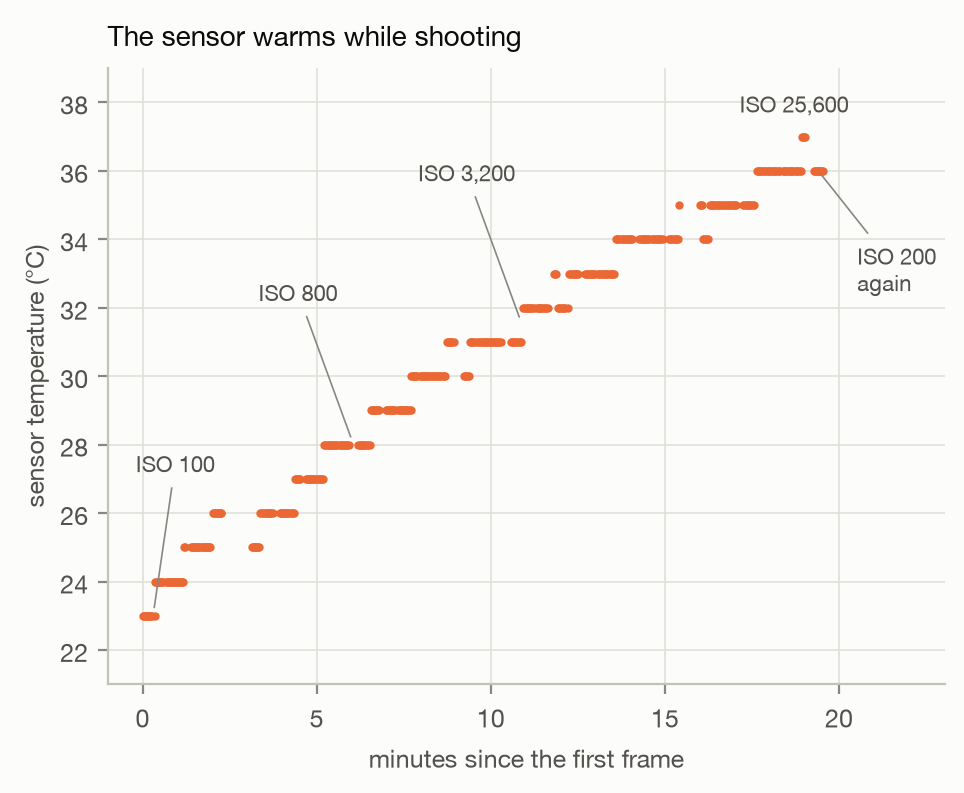
<p>We plot that <code class="language-plaintext highlighter-rouge">SensorTemperature</code> vs <code class="language-plaintext highlighter-rouge">DateTimeOriginal</code> (of the first frame) from that one continuous run I did last. 20 frames per ISO, for all ISO settings. That does take a while to shoot. Clear upwards trend over time and the 23C - 37C range seems realistic. The last 10 ISO 200 pics I did because I got this idea while shooting. And they will come in handy as we’ll see next.</p>

<p>So we do know temperature goes up, but does that affect anything, and if, by how much?</p>

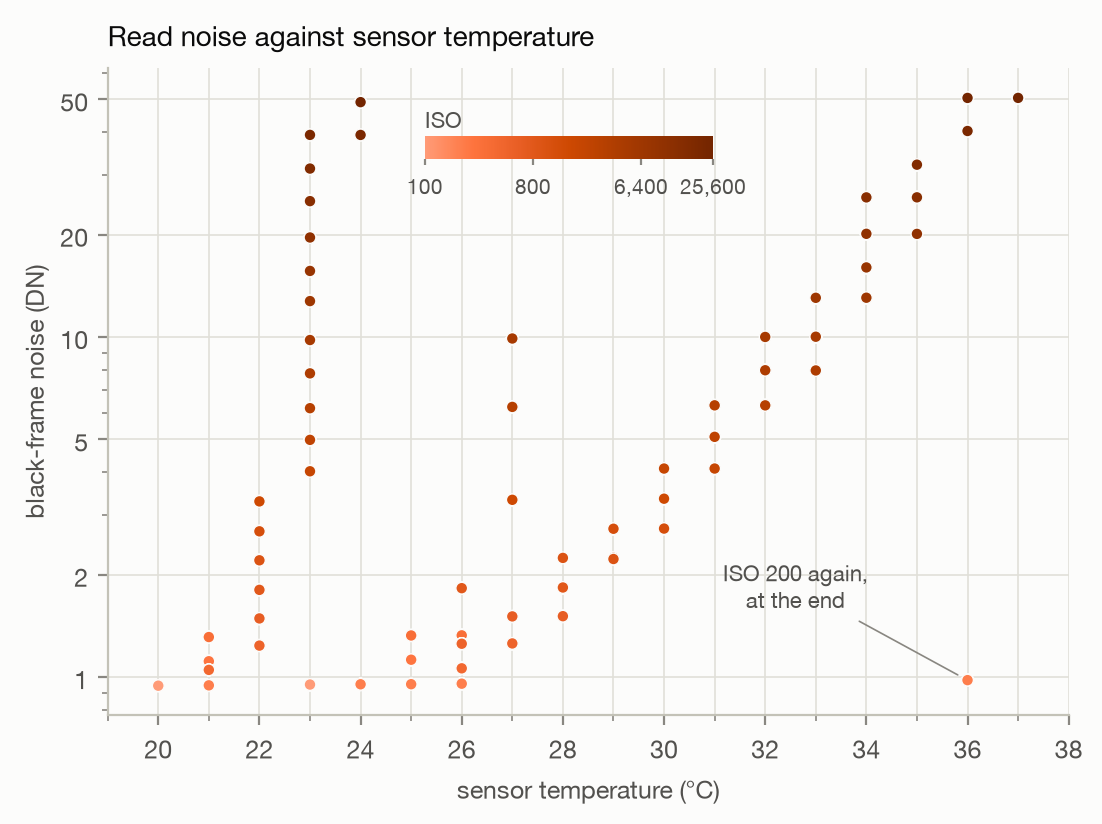
<p>What if we just plot the noise (that we know how to calculate from <a href="https://pudelkom.github.io/2026/10/26/iso-invariance-em10ii.html#test-2-noise-vs-gain">before</a>) against the sensor temp?
<img src="/assets/images/e-m10ii-temp/temperature_raw_em10.png" alt="read_noise_vs_temp" /></p>

<p>Looks like there is <em>something</em> at first glance, but no. This is just a Noise vs ISO plot all over again. Look at the labeled ISO 200 point in the bottom right; high temps but still lower than most points. <em>But slightly higher than then other ISO 200 points?!</em> Maybe we do have something there, just need to normalize the data somehow.</p>

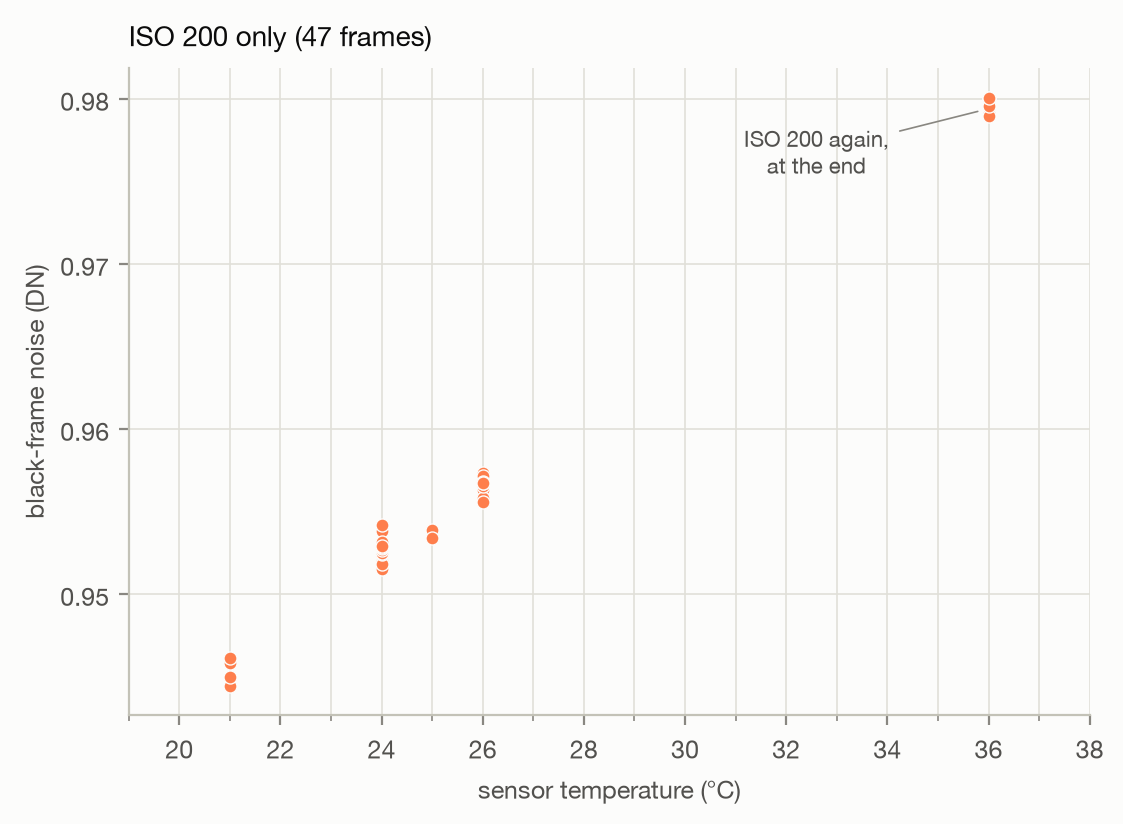
<p>Hmm, just to confirm plot only the ISO 200s I have most of anyway:</p>

<p><img src="/assets/images/e-m10ii-temp/temperature_iso200_em10.png" alt="read_noise_vs_temp_iso200" /></p>

<p>Okay, better. I ahvent seen any raw files with fractional C, so that quantization probably explains the slight spread at each C point. I’m also not shooting a single additional frame just to fill the gap, so we’ll run with this. Looks linear enough :gigachad:</p>

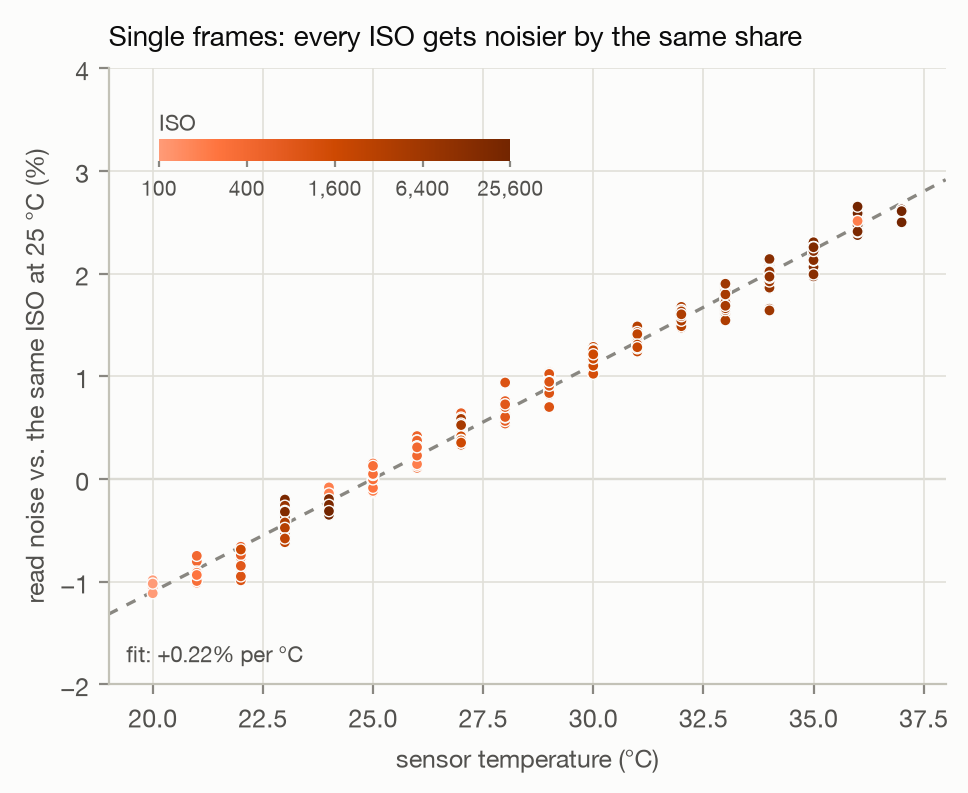
<p>Alright, let’s just do a least-squares fit over all this data. All in log scale as the absolute noise levels between ISOs differ so much, and we want to compare relatively based on temperature not ISO anyway. Math-lets cover your eyes for this one:</p>

<div class="language-python highlighter-rouge"><div class="highlight"><pre class="highlight"><code><span class="kn">import</span> <span class="nn">json</span><span class="p">,</span> <span class="n">subprocess</span>
<span class="kn">from</span> <span class="nn">datetime</span> <span class="kn">import</span> <span class="n">datetime</span>
<span class="kn">import</span> <span class="nn">numpy</span> <span class="k">as</span> <span class="n">np</span><span class="p">,</span> <span class="n">rawpy</span>

<span class="k">def</span> <span class="nf">temperature_slope</span><span class="p">(</span><span class="o">*</span><span class="n">folders</span><span class="p">):</span>
    <span class="k">def</span> <span class="nf">frame</span><span class="p">(</span><span class="n">path</span><span class="p">):</span>                     <span class="c1"># all four color channels, borders cut off
</span>        <span class="k">with</span> <span class="n">rawpy</span><span class="p">.</span><span class="n">imread</span><span class="p">(</span><span class="n">path</span><span class="p">)</span> <span class="k">as</span> <span class="n">raw</span><span class="p">:</span>
            <span class="k">return</span> <span class="n">raw</span><span class="p">.</span><span class="n">raw_image_visible</span><span class="p">[</span><span class="mi">64</span><span class="p">:</span><span class="o">-</span><span class="mi">64</span><span class="p">,</span> <span class="mi">64</span><span class="p">:</span><span class="o">-</span><span class="mi">64</span><span class="p">].</span><span class="n">astype</span><span class="p">(</span><span class="nb">float</span><span class="p">)</span>

    <span class="k">def</span> <span class="nf">noise</span><span class="p">(</span><span class="n">x</span><span class="p">):</span>                        <span class="c1"># standard deviation without outliers
</span>        <span class="n">med</span> <span class="o">=</span> <span class="n">np</span><span class="p">.</span><span class="n">median</span><span class="p">(</span><span class="n">x</span><span class="p">)</span>
        <span class="n">mad</span> <span class="o">=</span> <span class="mf">1.4826</span> <span class="o">*</span> <span class="n">np</span><span class="p">.</span><span class="n">median</span><span class="p">(</span><span class="n">np</span><span class="p">.</span><span class="nb">abs</span><span class="p">(</span><span class="n">x</span> <span class="o">-</span> <span class="n">med</span><span class="p">))</span>
        <span class="k">return</span> <span class="n">x</span><span class="p">[</span><span class="n">np</span><span class="p">.</span><span class="nb">abs</span><span class="p">(</span><span class="n">x</span> <span class="o">-</span> <span class="n">med</span><span class="p">)</span> <span class="o">&lt;=</span> <span class="mi">5</span> <span class="o">*</span> <span class="nb">max</span><span class="p">(</span><span class="n">mad</span><span class="p">,</span> <span class="mf">0.5</span><span class="p">)].</span><span class="n">std</span><span class="p">()</span>

    <span class="n">info</span> <span class="o">=</span> <span class="n">json</span><span class="p">.</span><span class="n">loads</span><span class="p">(</span><span class="n">subprocess</span><span class="p">.</span><span class="n">run</span><span class="p">([</span><span class="s">"exiftool"</span><span class="p">,</span> <span class="s">"-j"</span><span class="p">,</span> <span class="s">"-ISO"</span><span class="p">,</span> <span class="s">"-SensorTemperature"</span><span class="p">,</span> <span class="s">"-ext"</span><span class="p">,</span> <span class="s">"ORF"</span><span class="p">,</span> <span class="o">*</span><span class="nb">map</span><span class="p">(</span><span class="nb">str</span><span class="p">,</span> <span class="n">folders</span><span class="p">)],</span>
                                     <span class="n">capture_output</span><span class="o">=</span><span class="bp">True</span><span class="p">,</span> <span class="n">text</span><span class="o">=</span><span class="bp">True</span><span class="p">).</span><span class="n">stdout</span><span class="p">)</span>
    <span class="n">points</span> <span class="o">=</span> <span class="p">[]</span>                          <span class="c1"># (ISO, temperature, log of the noise)
</span>    <span class="k">for</span> <span class="n">i</span> <span class="ow">in</span> <span class="n">info</span><span class="p">:</span>
        <span class="n">v</span> <span class="o">=</span> <span class="n">frame</span><span class="p">(</span><span class="n">i</span><span class="p">[</span><span class="s">"SourceFile"</span><span class="p">])</span>
        <span class="n">n</span> <span class="o">=</span> <span class="n">np</span><span class="p">.</span><span class="n">mean</span><span class="p">([</span><span class="n">noise</span><span class="p">(</span><span class="n">v</span><span class="p">[</span><span class="n">a</span><span class="p">::</span><span class="mi">2</span><span class="p">,</span> <span class="n">b</span><span class="p">::</span><span class="mi">2</span><span class="p">])</span> <span class="k">for</span> <span class="n">a</span> <span class="ow">in</span> <span class="p">(</span><span class="mi">0</span><span class="p">,</span> <span class="mi">1</span><span class="p">)</span> <span class="k">for</span> <span class="n">b</span> <span class="ow">in</span> <span class="p">(</span><span class="mi">0</span><span class="p">,</span> <span class="mi">1</span><span class="p">)])</span>
        <span class="n">points</span><span class="p">.</span><span class="n">append</span><span class="p">((</span><span class="n">i</span><span class="p">[</span><span class="s">"ISO"</span><span class="p">],</span> <span class="nb">int</span><span class="p">(</span><span class="nb">str</span><span class="p">(</span><span class="n">i</span><span class="p">[</span><span class="s">"SensorTemperature"</span><span class="p">]).</span><span class="n">split</span><span class="p">()[</span><span class="mi">0</span><span class="p">]),</span> <span class="n">np</span><span class="p">.</span><span class="n">log</span><span class="p">(</span><span class="n">n</span><span class="p">)))</span>

    <span class="n">isos</span> <span class="o">=</span> <span class="nb">sorted</span><span class="p">({</span><span class="n">p</span><span class="p">[</span><span class="mi">0</span><span class="p">]</span> <span class="k">for</span> <span class="n">p</span> <span class="ow">in</span> <span class="n">points</span><span class="p">})</span>
    <span class="n">x</span> <span class="o">=</span> <span class="n">np</span><span class="p">.</span><span class="n">array</span><span class="p">([[</span><span class="n">c</span><span class="p">]</span> <span class="o">+</span> <span class="p">[</span><span class="n">iso</span> <span class="o">==</span> <span class="n">k</span> <span class="k">for</span> <span class="n">k</span> <span class="ow">in</span> <span class="n">isos</span><span class="p">]</span> <span class="k">for</span> <span class="n">iso</span><span class="p">,</span> <span class="n">c</span><span class="p">,</span> <span class="n">_</span> <span class="ow">in</span> <span class="n">points</span><span class="p">],</span> <span class="n">dtype</span><span class="o">=</span><span class="nb">float</span><span class="p">)</span>
    <span class="n">coef</span> <span class="o">=</span> <span class="n">np</span><span class="p">.</span><span class="n">linalg</span><span class="p">.</span><span class="n">lstsq</span><span class="p">(</span><span class="n">x</span><span class="p">,</span> <span class="p">[</span><span class="n">p</span><span class="p">[</span><span class="mi">2</span><span class="p">]</span> <span class="k">for</span> <span class="n">p</span> <span class="ow">in</span> <span class="n">points</span><span class="p">],</span> <span class="n">rcond</span><span class="o">=</span><span class="bp">None</span><span class="p">)[</span><span class="mi">0</span><span class="p">]</span>
    <span class="k">return</span> <span class="n">coef</span><span class="p">[</span><span class="mi">0</span><span class="p">],</span> <span class="nb">dict</span><span class="p">(</span><span class="nb">zip</span><span class="p">(</span><span class="n">isos</span><span class="p">,</span> <span class="n">coef</span><span class="p">[</span><span class="mi">1</span><span class="p">:])),</span> <span class="n">points</span>


<span class="n">slope</span><span class="p">,</span> <span class="n">levels</span><span class="p">,</span> <span class="n">points</span> <span class="o">=</span> <span class="n">temperature_slope</span><span class="p">(</span><span class="s">"raw_data/e-m10 dark frames"</span><span class="p">,</span> <span class="s">"raw_data/lens_cap"</span><span class="p">)</span>

<span class="k">for</span> <span class="n">iso</span><span class="p">,</span> <span class="n">temp</span><span class="p">,</span> <span class="n">log_noise</span> <span class="ow">in</span> <span class="n">points</span><span class="p">:</span>
    <span class="n">at_25</span> <span class="o">=</span> <span class="n">levels</span><span class="p">[</span><span class="n">iso</span><span class="p">]</span> <span class="o">+</span> <span class="mi">25</span> <span class="o">*</span> <span class="n">slope</span>           <span class="c1"># this ISO's log noise at 25C
</span>    <span class="n">y</span> <span class="o">=</span> <span class="mi">100</span> <span class="o">*</span> <span class="n">np</span><span class="p">.</span><span class="n">expm1</span><span class="p">(</span><span class="n">log_noise</span> <span class="o">-</span> <span class="n">at_25</span><span class="p">)</span>      <span class="c1"># % above or below that
</span>    <span class="n">plt</span><span class="p">.</span><span class="n">scatter</span><span class="p">(</span><span class="n">temp</span><span class="p">,</span> <span class="n">y</span><span class="p">,</span> <span class="n">c</span><span class="o">=</span><span class="p">[</span><span class="n">np</span><span class="p">.</span><span class="n">log2</span><span class="p">(</span><span class="n">iso</span><span class="p">)],</span> <span class="n">vmin</span><span class="o">=</span><span class="n">np</span><span class="p">.</span><span class="n">log2</span><span class="p">(</span><span class="mi">100</span><span class="p">),</span> <span class="n">vmax</span><span class="o">=</span><span class="n">np</span><span class="p">.</span><span class="n">log2</span><span class="p">(</span><span class="mi">25600</span><span class="p">))</span>

<span class="n">t</span> <span class="o">=</span> <span class="n">np</span><span class="p">.</span><span class="n">linspace</span><span class="p">(</span><span class="mi">19</span><span class="p">,</span> <span class="mi">38</span><span class="p">)</span>
<span class="n">plt</span><span class="p">.</span><span class="n">plot</span><span class="p">(</span><span class="n">t</span><span class="p">,</span> <span class="mi">100</span> <span class="o">*</span> <span class="n">np</span><span class="p">.</span><span class="n">expm1</span><span class="p">(</span><span class="n">slope</span> <span class="o">*</span> <span class="p">(</span><span class="n">t</span> <span class="o">-</span> <span class="mi">25</span><span class="p">)),</span> <span class="s">"--"</span><span class="p">)</span>   <span class="c1"># the fitted line, 0% at 25C
</span></code></pre></div></div>

<p><img src="/assets/images/e-m10ii-temp/temperature_single_frames.png" alt="" /></p>

<p>Looks like we nailed it! +0.22% noise in DN per C.</p>

<p>Now the all imporant question: <strong>Is that a lot?</strong></p>

<p>Maybe?</p>

<p>For comparing between cameras or in actual photos (remember that these are all dark frames) this seems small: a 12C increase changes read noise by about 2.6%, or 0.03 stops of dynamic range on the E-M10II. <em>Probably nothing</em>. Any actual light input will dominate this. Then again, astro photography is basically dark frames.</p>

<p>But for analytically comparing ISO performance it might make a difference: that same 12C/2.6% noise difference might blur the lines on already small effects when there is no light involved.</p>

<p>Might be worth a try pushing this to the extremes. Same scene + tripod, camera straight from a freezer then letting it get toasty in the sun.</p>

<h2 id="appendix">Appendix</h2>

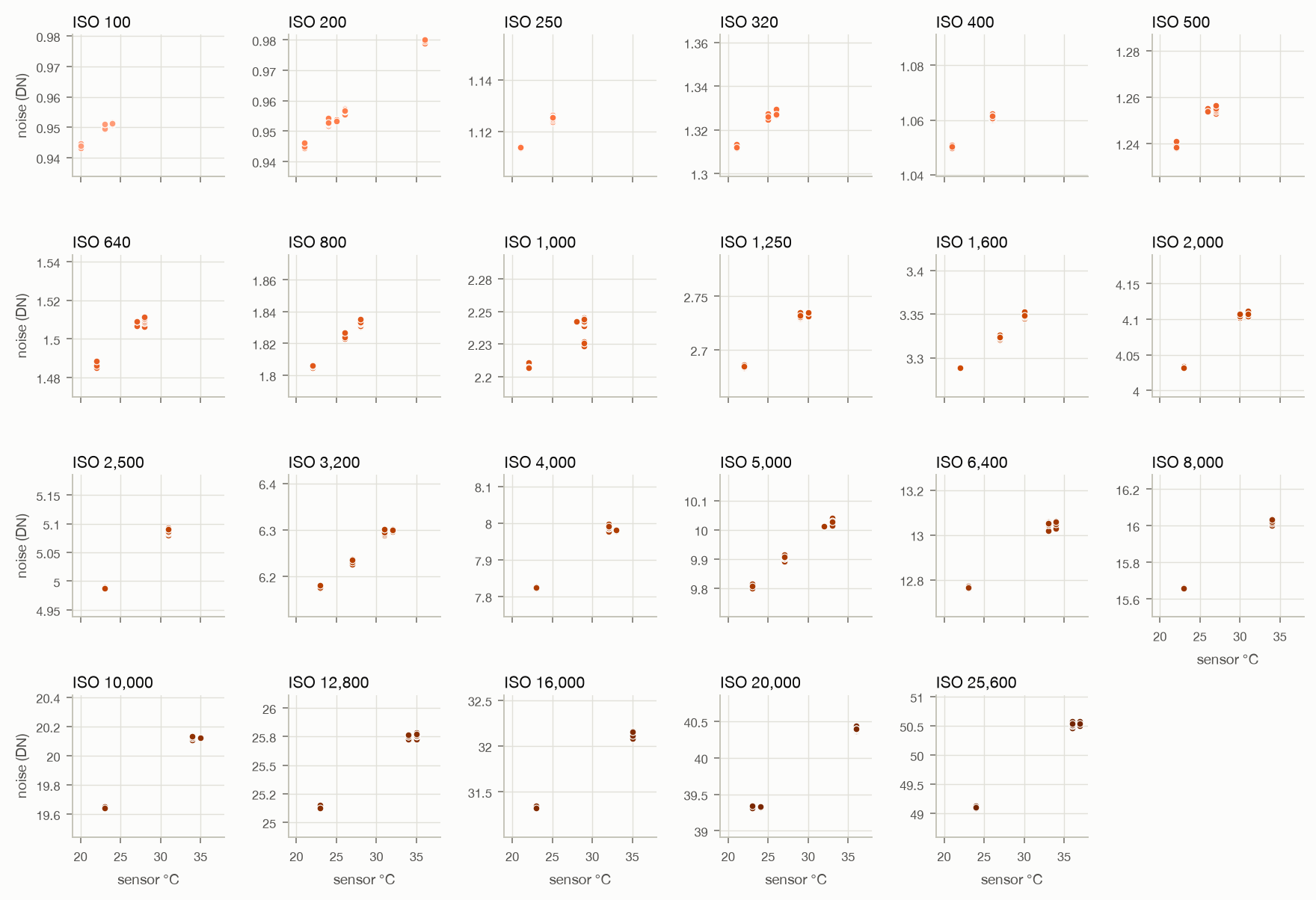
<p>Noise vs temperature, split by ISO:
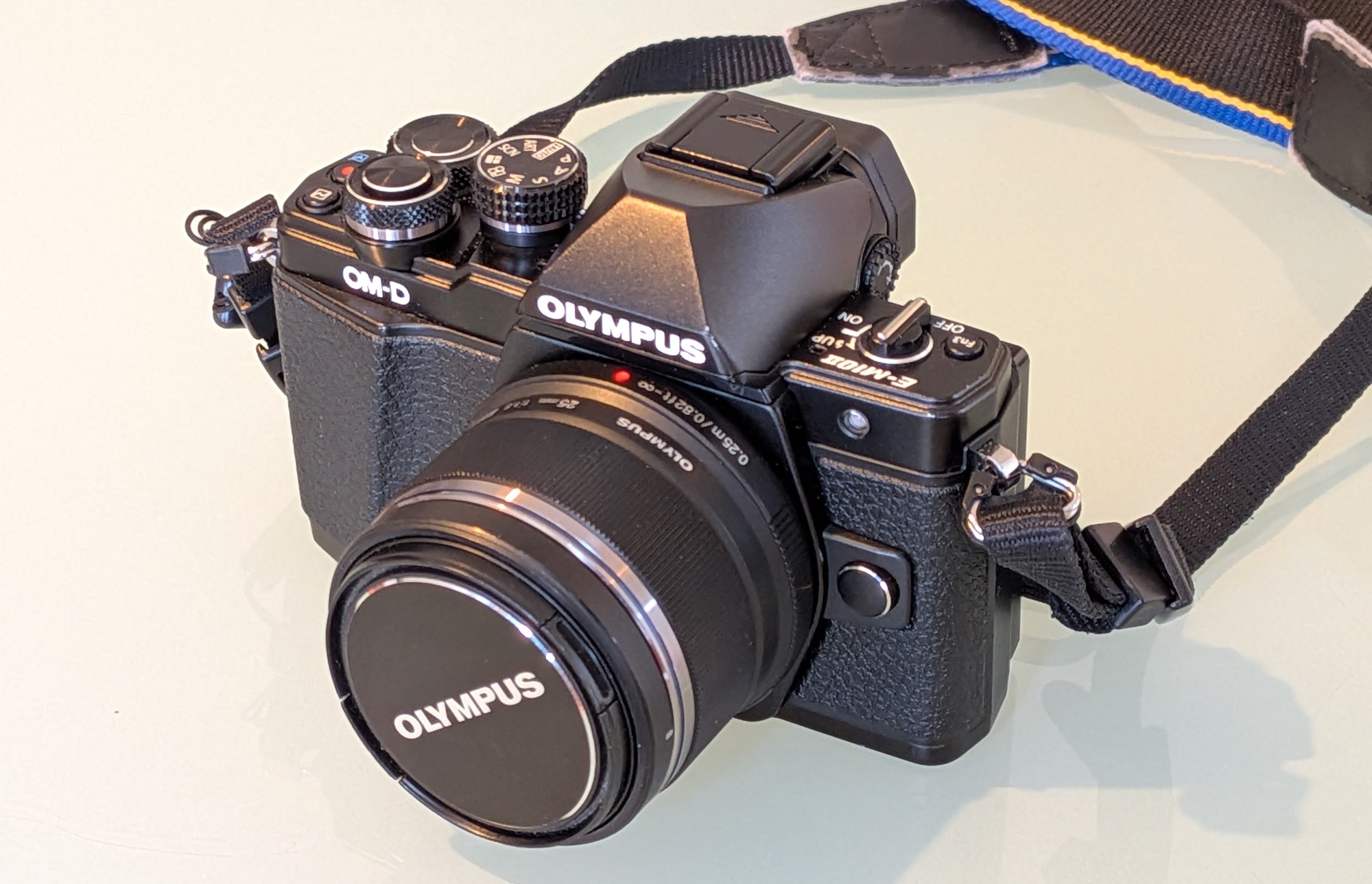
<img src="/assets/images/e-m10ii-temp/temperature_every_iso_em10.png" alt="all_iso" /></p>]]></content><author><name></name></author><summary type="html"><![CDATA[While shooting another dark frame set with my E-M10II (previous post), I noticed that the camera got noticibly warmer over time, and wondered if that had any impact on noise. In astrophotography circles and scientific/industrial applications this is known issue after all [1][2][3].]]></summary></entry><entry><title type="html">Testing ISO Invariance of the Olympus E-M10 II</title><link href="https://pudelkom.github.io/2026/10/26/iso-invariance-em10ii.html" rel="alternate" type="text/html" title="Testing ISO Invariance of the Olympus E-M10 II" /><published>2026-10-26T00:00:00+00:00</published><updated>2026-10-26T00:00:00+00:00</updated><id>https://pudelkom.github.io/2026/10/26/iso-invariance-em10ii</id><content type="html" xml:base="https://pudelkom.github.io/2026/10/26/iso-invariance-em10ii.html"><![CDATA[<p><img src="/assets/images/iso-invariance-em10ii/em10ii.jpg" alt="camera" /></p>

<p>My Olympus E-M10II is advertised as a 200 to 5000 ISO camera, with values above and below being “extensions”. Yet I read many times that ISOs above so and so are unusable or garbage (usually 3200 or 6400). Let’s see if we can figure out some more with statistics.</p>

<p>Most of the math here is based on <a href="https://www.photonstophotos.net/GeneralTopics/Sensors_&amp;_Raw/Sensor_Analysis_Primer/Read_Noise_-_Optical_Black.htm">photonstophotos.net - Sensor Analysis Primer - Read Noise - Optical Black</a>. Give it a read, it’s pretty informative.</p>

<p>That being said, I have no clue what I’m doing.</p>

<h2 id="background">Background</h2>

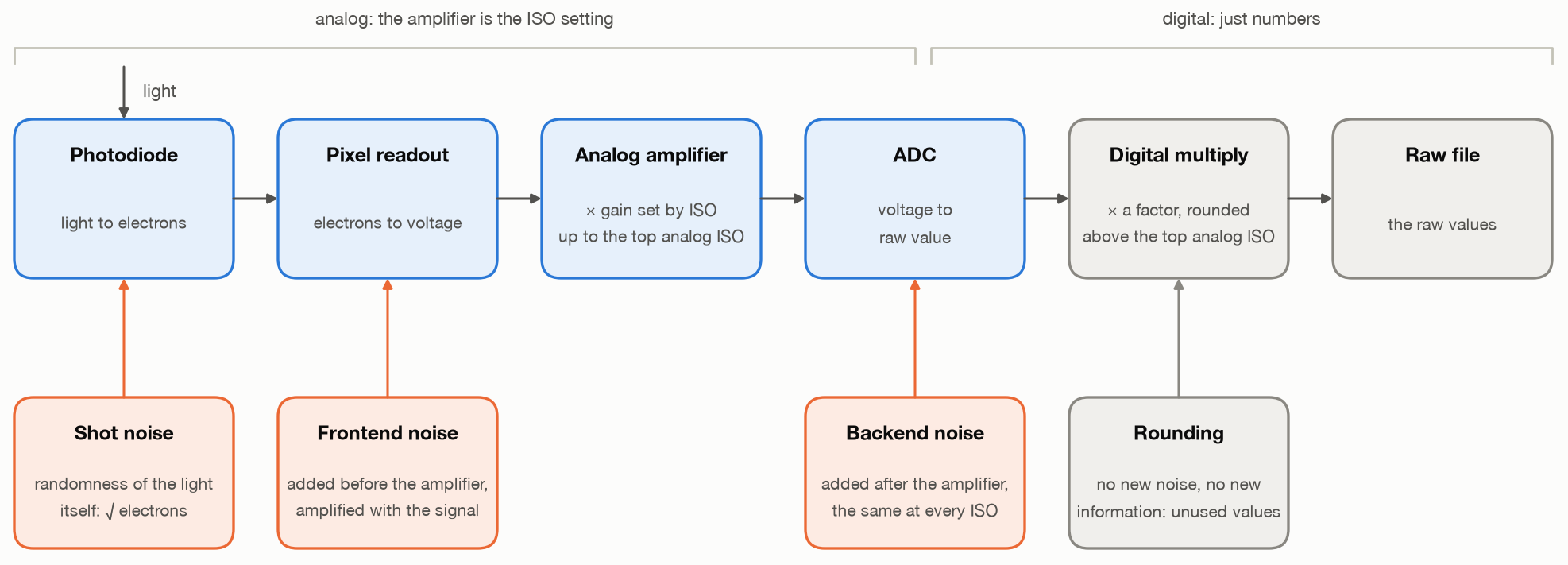
<p>Photons go though many stages before getting stored in a raw file. Many of those steps are not perfect and introduce noise. Here is a rough overview:</p>

<p><img src="/assets/images/iso-invariance-em10ii/iso_pipeline.png" alt="iso_pipeline" /></p>

<p>We can really only control the input and observe the final output, the intermediate results are hidden inside the camera. But, with some clever math and physics, some information can be deduced.</p>

<h2 id="preparation">Preparation</h2>

<p><strong>Data:</strong> You will need at least one raw black frame (lens cap on) per major ISO setting (LOW, 200, 400, 800, etc). Turn <em>Noise Reduction</em> (different from <em>Noise Filter</em>!) and <em>Shading Compensation</em> off as they mess with the raw data. Multiple shots don’t hurt if you want more statistical significance. Shutter speed does not really matter, but don’t do long exposures as it makes hot pixels worse by heating up the sensor. Pick 1/100 and stick with it. Lens and Aperture do not matter, we’re not capturing any light (I guess a body cap would be best for this test?).</p>

<p>numpy and rawpy to do the heavy lifting:</p>

<div class="language-python highlighter-rouge"><div class="highlight"><pre class="highlight"><code><span class="kn">import</span> <span class="nn">numpy</span> <span class="k">as</span> <span class="n">np</span><span class="p">,</span> <span class="n">rawpy</span>

<span class="c1"># raw values of one green channel
</span><span class="k">def</span> <span class="nf">green</span><span class="p">(</span><span class="n">path</span><span class="p">):</span>
    <span class="k">with</span> <span class="n">rawpy</span><span class="p">.</span><span class="n">imread</span><span class="p">(</span><span class="n">path</span><span class="p">)</span> <span class="k">as</span> <span class="n">raw</span><span class="p">:</span>
        <span class="k">return</span> <span class="n">raw</span><span class="p">.</span><span class="n">raw_image_visible</span><span class="p">[</span><span class="mi">0</span><span class="p">::</span><span class="mi">2</span><span class="p">,</span> <span class="mi">1</span><span class="p">::</span><span class="mi">2</span><span class="p">].</span><span class="n">ravel</span><span class="p">().</span><span class="n">astype</span><span class="p">(</span><span class="nb">int</span><span class="p">)</span>

<span class="c1"># standard deviation without hot pixels
</span><span class="k">def</span> <span class="nf">noise</span><span class="p">(</span><span class="n">x</span><span class="p">):</span>
    <span class="n">med</span> <span class="o">=</span> <span class="n">np</span><span class="p">.</span><span class="n">median</span><span class="p">(</span><span class="n">x</span><span class="p">)</span>
    <span class="n">mad</span> <span class="o">=</span> <span class="n">np</span><span class="p">.</span><span class="n">median</span><span class="p">(</span><span class="n">np</span><span class="p">.</span><span class="nb">abs</span><span class="p">(</span><span class="n">x</span> <span class="o">-</span> <span class="n">med</span><span class="p">))</span>
    <span class="k">return</span> <span class="n">x</span><span class="p">[</span><span class="n">np</span><span class="p">.</span><span class="nb">abs</span><span class="p">(</span><span class="n">x</span> <span class="o">-</span> <span class="n">med</span><span class="p">)</span> <span class="o">&lt;</span> <span class="mf">7.4</span> <span class="o">*</span> <span class="n">mad</span><span class="p">].</span><span class="n">std</span><span class="p">()</span>  <span class="c1"># 5σ
</span></code></pre></div></div>

<p><em>Why only one green channel? Red, blue and the second green gave me the same results, this keeps the code simple.</em></p>

<h2 id="test-1-which-raw-values-occur">Test 1: Which Raw Values Occur?</h2>

<p>Read noise spreads a black frame over the values around the black level. An analog gain
widens that spread and still produces every value. Multiplying integers by <em>k</em> puts them on a grid
with steps of <em>k</em>, so a share of <em>1 − 1/k</em> of the values stays empty.</p>

<div class="language-python highlighter-rouge"><div class="highlight"><pre class="highlight"><code><span class="n">g</span> <span class="o">=</span> <span class="n">green</span><span class="p">(</span><span class="s">"lens_cap_iso_5000.ORF"</span><span class="p">)</span>
<span class="n">counts</span> <span class="o">=</span> <span class="n">np</span><span class="p">.</span><span class="n">bincount</span><span class="p">(</span><span class="n">g</span><span class="p">)</span>  <span class="c1"># histogram with one bin per raw value
</span><span class="n">mu</span><span class="p">,</span> <span class="n">sd</span> <span class="o">=</span> <span class="n">g</span><span class="p">.</span><span class="n">mean</span><span class="p">(),</span> <span class="n">noise</span><span class="p">(</span><span class="n">g</span><span class="p">)</span>  <span class="c1"># center and spread
</span><span class="n">v</span> <span class="o">=</span> <span class="n">np</span><span class="p">.</span><span class="n">arange</span><span class="p">(</span><span class="nb">int</span><span class="p">(</span><span class="n">mu</span> <span class="o">-</span> <span class="mi">2</span> <span class="o">*</span> <span class="n">sd</span><span class="p">),</span> <span class="nb">int</span><span class="p">(</span><span class="n">mu</span> <span class="o">+</span> <span class="mi">2</span> <span class="o">*</span> <span class="n">sd</span><span class="p">)</span> <span class="o">+</span> <span class="mi">1</span><span class="p">)</span>  <span class="c1"># we're only looking at the core of the histogram, 2σ
</span><span class="k">for</span> <span class="n">offset</span><span class="p">,</span> <span class="n">n</span> <span class="ow">in</span> <span class="nb">zip</span><span class="p">(</span><span class="n">v</span> <span class="o">-</span> <span class="nb">round</span><span class="p">(</span><span class="n">mu</span><span class="p">),</span> <span class="n">counts</span><span class="p">[</span><span class="n">v</span><span class="p">]):</span>  <span class="c1"># relative to center
</span>    <span class="k">print</span><span class="p">(</span><span class="sa">f</span><span class="s">"</span><span class="si">{</span><span class="n">offset</span><span class="si">:</span><span class="o">+</span><span class="mi">4</span><span class="n">d</span><span class="si">}</span><span class="s"> </span><span class="si">{</span><span class="n">n</span><span class="si">:</span><span class="mi">8</span><span class="n">d</span><span class="si">}</span><span class="s">"</span><span class="p">)</span>
</code></pre></div></div>

<p>This gives us:</p>

<div class="language-plaintext highlighter-rouge"><div class="highlight"><pre class="highlight"><code> -20        0
 -19    38989
 -18    52575
 -17        0
 -16    68884
 -15        0
 -14    88145
 -13   110907
 -12        0
 -11   134651
 -10   159997
  -9        4
  -8   185031
  -7       17
  -6   208281
  -5   228684
  -4       34
  -3   243926
  -2   254485
  -1       32
  +0   258715
  +1       28
  +2   256488
  +3   245961
  +4       18
  +5   231683
  +6   211104
  +7       11
  +8   188362
  +9   163978
 +10        4
 +11   139408
 +12        2
 +13   114958
 +14    92379
 +15        0
 +16    72675
 +17    55338
 +18        0
 +19    41090
</code></pre></div></div>

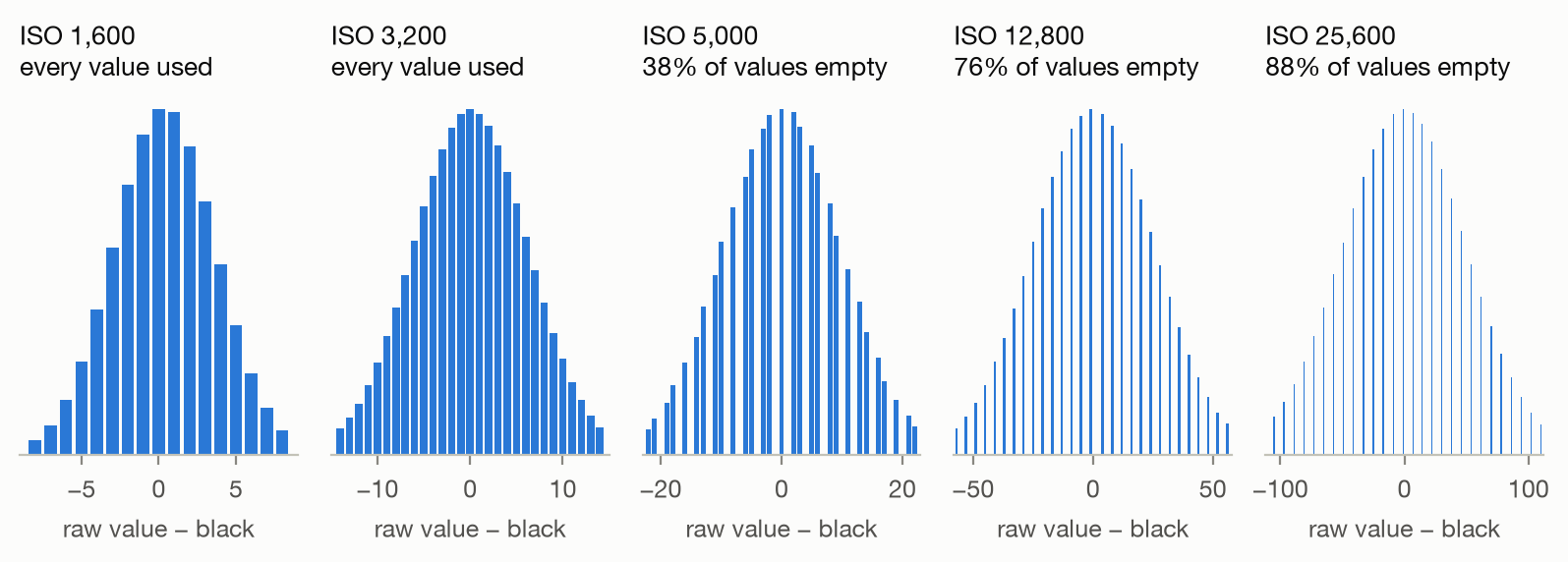
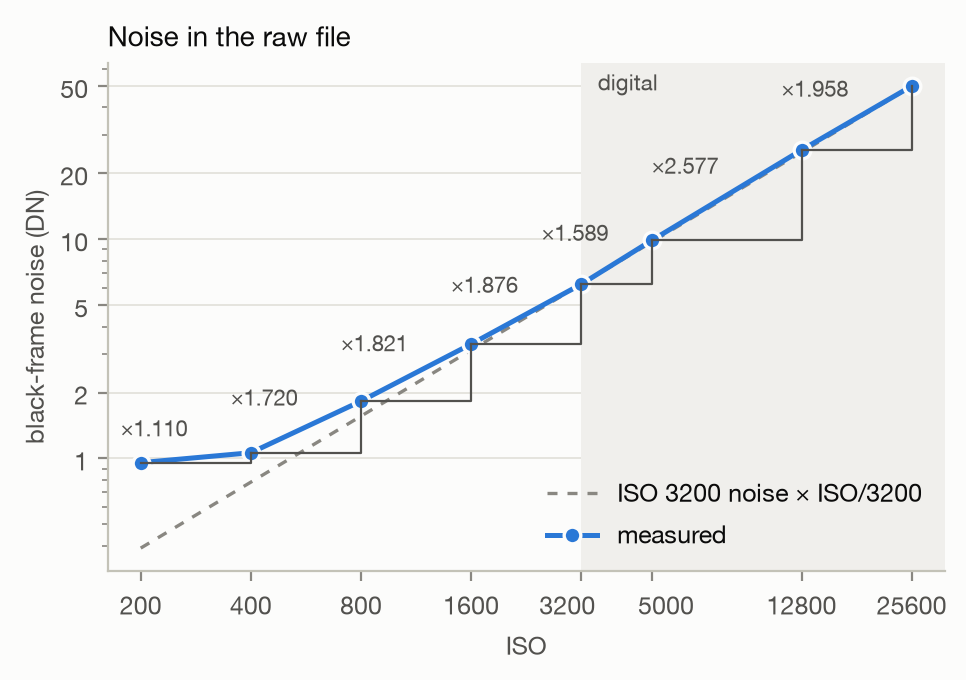
<p>Aha! So some raw values never (or very rarely) occur in the 5000 ISO file! Lets repeat this for the other ISO values and plot them for easier reading. Here are the results:</p>

<p><img src="/assets/images/iso-invariance-em10ii/histograms.png" alt="Histograms of raw values near black at ISO 1600, 3200, 5000, 12800 and 25600" /></p>

<table>
  <thead>
    <tr>
      <th style="text-align: right">ISO</th>
      <th style="text-align: right">empty values</th>
      <th style="text-align: right">expected if ISO 3200 × <em>k</em></th>
    </tr>
  </thead>
  <tbody>
    <tr>
      <td style="text-align: right">200–3200</td>
      <td style="text-align: right">0%</td>
      <td style="text-align: right">–</td>
    </tr>
    <tr>
      <td style="text-align: right">5000</td>
      <td style="text-align: right">37.6%</td>
      <td style="text-align: right">36.9%</td>
    </tr>
    <tr>
      <td style="text-align: right">12800</td>
      <td style="text-align: right">75.8%</td>
      <td style="text-align: right">75.0%</td>
    </tr>
    <tr>
      <td style="text-align: right">25600</td>
      <td style="text-align: right">87.6%</td>
      <td style="text-align: right">87.5%</td>
    </tr>
  </tbody>
</table>

<p>ISO 3200 is the highest ISO that still fills every value. Every higher setting just digitally multiplies (i.e. brightens) the sensor readings without adding more signal.</p>

<h2 id="test-2-noise-vs-gain">Test 2: Noise vs Gain</h2>

<p>A higher analog gain should lift the signal above the noise added after the amplifier, so noise referred back to the sensor should drop. A digital multiply on the other hand just scales signal and noise alike: the black-frame noise grows by exactly <em>k</em>.</p>

<p>We already have everything to plot the various noise DN values:</p>
<div class="language-python highlighter-rouge"><div class="highlight"><pre class="highlight"><code><span class="n">dn</span> <span class="o">=</span> <span class="n">noise</span><span class="p">(</span><span class="n">green</span><span class="p">(</span><span class="s">"lens_cap_iso_5000.ORF"</span><span class="p">))</span>  <span class="c1"># Digital Numbers
</span></code></pre></div></div>

<p>Then, calculate the relative noise increase for all ISO steps:</p>

<div class="language-python highlighter-rouge"><div class="highlight"><pre class="highlight"><code><span class="n">noise</span><span class="p">(</span><span class="n">green</span><span class="p">(</span><span class="s">"lens_cap_iso_5000.ORF"</span><span class="p">))</span> <span class="o">/</span> <span class="n">noise</span><span class="p">(</span><span class="n">green</span><span class="p">(</span><span class="s">"lens_cap_iso_3200.ORF"</span><span class="p">))</span>   <span class="c1"># 1.589
</span></code></pre></div></div>

<p><img src="/assets/images/iso-invariance-em10ii/noise.png" alt="Black-frame noise per ISO, as recorded and divided by the gain" /></p>

<table>
  <thead>
    <tr>
      <th>step</th>
      <th style="text-align: right">noise factor</th>
      <th style="text-align: right">ISO factor</th>
      <th style="text-align: right">noise per ISO</th>
    </tr>
  </thead>
  <tbody>
    <tr>
      <td>200 → 400</td>
      <td style="text-align: right">×1.110</td>
      <td style="text-align: right">×2</td>
      <td style="text-align: right">0.555</td>
    </tr>
    <tr>
      <td>400 → 800</td>
      <td style="text-align: right">×1.720</td>
      <td style="text-align: right">×2</td>
      <td style="text-align: right">0.860</td>
    </tr>
    <tr>
      <td>800 → 1600</td>
      <td style="text-align: right">×1.821</td>
      <td style="text-align: right">×2</td>
      <td style="text-align: right">0.910</td>
    </tr>
    <tr>
      <td>1600 → 3200</td>
      <td style="text-align: right">×1.876</td>
      <td style="text-align: right">×2</td>
      <td style="text-align: right">0.938</td>
    </tr>
    <tr>
      <td>3200 → 5000</td>
      <td style="text-align: right">×1.589</td>
      <td style="text-align: right">×1.5625</td>
      <td style="text-align: right">1.017</td>
    </tr>
    <tr>
      <td>5000 → 12800</td>
      <td style="text-align: right">×2.577</td>
      <td style="text-align: right">×2.56</td>
      <td style="text-align: right">1.007</td>
    </tr>
    <tr>
      <td>12800 → 25600</td>
      <td style="text-align: right">×1.958</td>
      <td style="text-align: right">×2</td>
      <td style="text-align: right">0.979</td>
    </tr>
  </tbody>
</table>

<p>Up to 3200, each doubling of ISO raises the noise by less than ×2. Above 3200 the noise roughly keeps pace with the ISO. On its own, noise is a weak test. The empty values from test 1 are more definitive.</p>

<h2 id="conclusion">Conclusion</h2>

<ul>
  <li><strong>ISO 3200 is the E-M10II’s highest analog ISO.</strong> ISO 2000, 2500, and below are analog too.</li>
  <li><strong>Every ISO above it is ISO 3200 digitally multiplied and rounded.</strong> The noise stays the same, values go missing, and the highlights clip
1, 2 and 3 stops earlier at 6400, 12800 and 25600.</li>
  <li><strong>In practice:</strong> cap <em>Auto ISO</em> at 3200 and brighten in post. Except for SOOC JPGs (which would be unusably dark), there are only downsides.</li>
</ul>]]></content><author><name></name></author><summary type="html"><![CDATA[]]></summary></entry><entry><title type="html">De-fishing the 7Artisans II 7.5mm f/2.8 (Micro Four Thirds) with ffmpeg</title><link href="https://pudelkom.github.io/2026/06/19/defishing-7artisans-7-5mm-ffmpeg.html" rel="alternate" type="text/html" title="De-fishing the 7Artisans II 7.5mm f/2.8 (Micro Four Thirds) with ffmpeg" /><published>2026-06-19T23:21:50+00:00</published><updated>2026-06-19T23:21:50+00:00</updated><id>https://pudelkom.github.io/2026/06/19/defishing-7artisans-7-5mm-ffmpeg</id><content type="html" xml:base="https://pudelkom.github.io/2026/06/19/defishing-7artisans-7-5mm-ffmpeg.html"><![CDATA[<p>A one-command way to convert the heavy fisheye curvature from a <strong>7Artisans 7.5mm Mark II f/2.8</strong>
(a APSC diagonal fisheye on MFT) into a natural-looking rectilinear image, using only
<code class="language-plaintext highlighter-rouge">ffmpeg</code>. No GUI, no plugins, no lens profile required.</p>

<h2 id="the-command">The command</h2>

<div class="language-sh highlighter-rouge"><div class="highlight"><pre class="highlight"><code>ffmpeg <span class="nt">-i</span> <span class="k">in</span>.jpg <span class="nt">-vf</span> <span class="s2">"v360=input=fisheye:output=flat:id_fov=142:d_fov=142:w=9216:h=6912:interp=lanczos,crop=6062:3648:(iw-ow)/2:(ih-oh)/2"</span> out.png
</code></pre></div></div>

<p>That’s it. Swap <code class="language-plaintext highlighter-rouge">in.jpg</code> / <code class="language-plaintext highlighter-rouge">out.png</code> for your filenames.</p>

<h2 id="background">Background</h2>

<p>The 7.5mm is sold as a ~190° fisheye, but that figure is the diagonal angle measured in the
lens’s own fisheye projection — feed it to a rectilinear remap directly and it badly
over-corrects. What you actually want is the <strong>effective diagonal field of view of the frame</strong>,
which for this lens/body lands around <strong>142°</strong> once tuned (see <em>Calibrating</em> below).</p>

<p><code class="language-plaintext highlighter-rouge">ffmpeg</code>’s <a href="https://ffmpeg.org/ffmpeg-filters.html#v360"><code class="language-plaintext highlighter-rouge">v360</code></a> filter reads the frame as a
<code class="language-plaintext highlighter-rouge">fisheye</code> projection and re-projects it to <code class="language-plaintext highlighter-rouge">flat</code> (rectilinear / gnomonic) — the “normal lens”
projection in which straight lines stay straight.</p>

<h2 id="the-pipeline-step-by-step">The pipeline, step by step</h2>

<h3 id="1-fisheye-original-straight-out-of-camera">1. Fisheye original (straight out of camera)</h3>

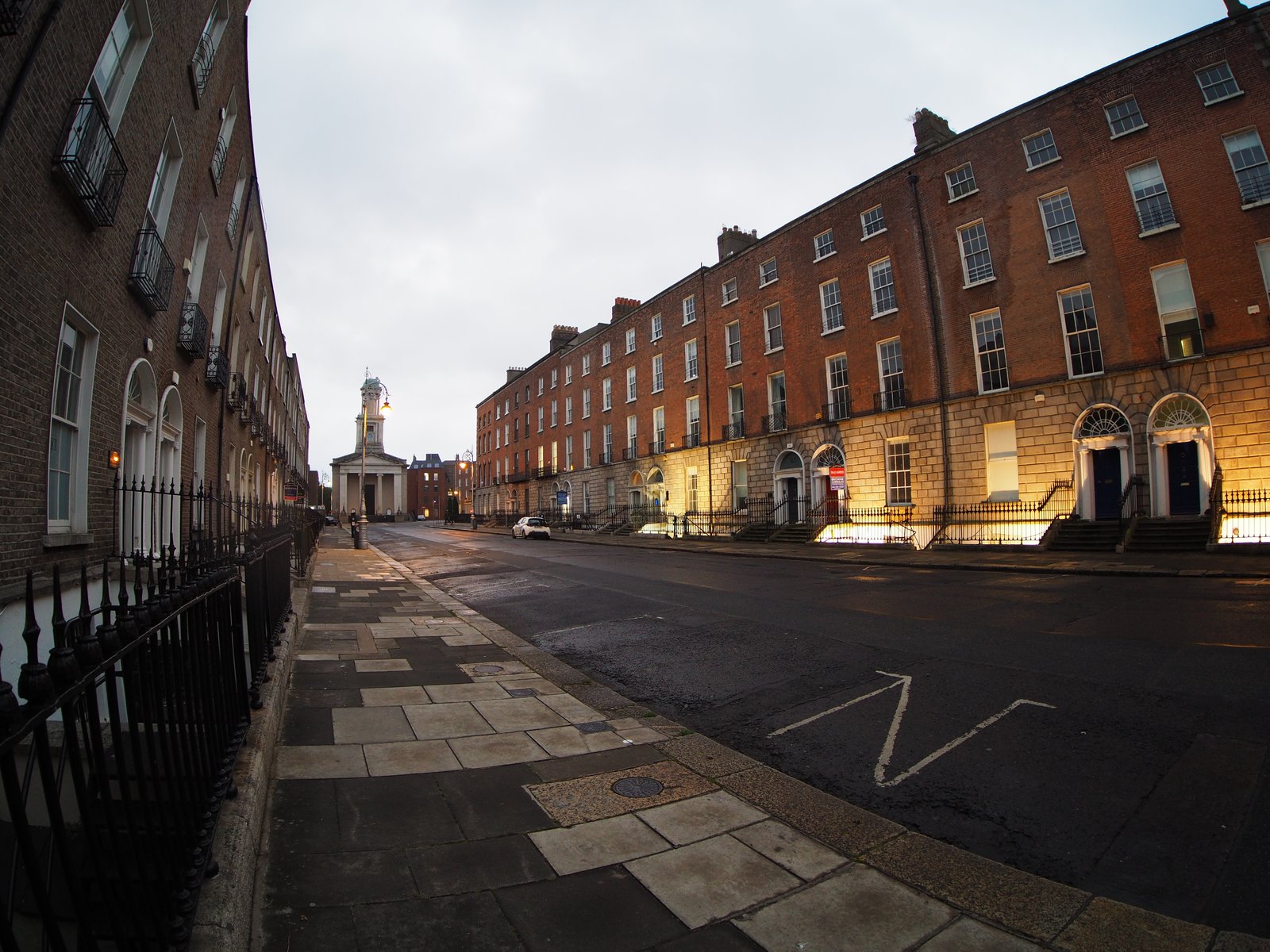
<p>Note the bowed rooflines and the curved iron railings.</p>

<p><img src="/assets/images/defish-7artisans/01-fisheye.jpg" alt="fisheye original" /></p>

<h3 id="2-after-v360-remap-before-cropping">2. After <code class="language-plaintext highlighter-rouge">v360</code> remap, before cropping</h3>

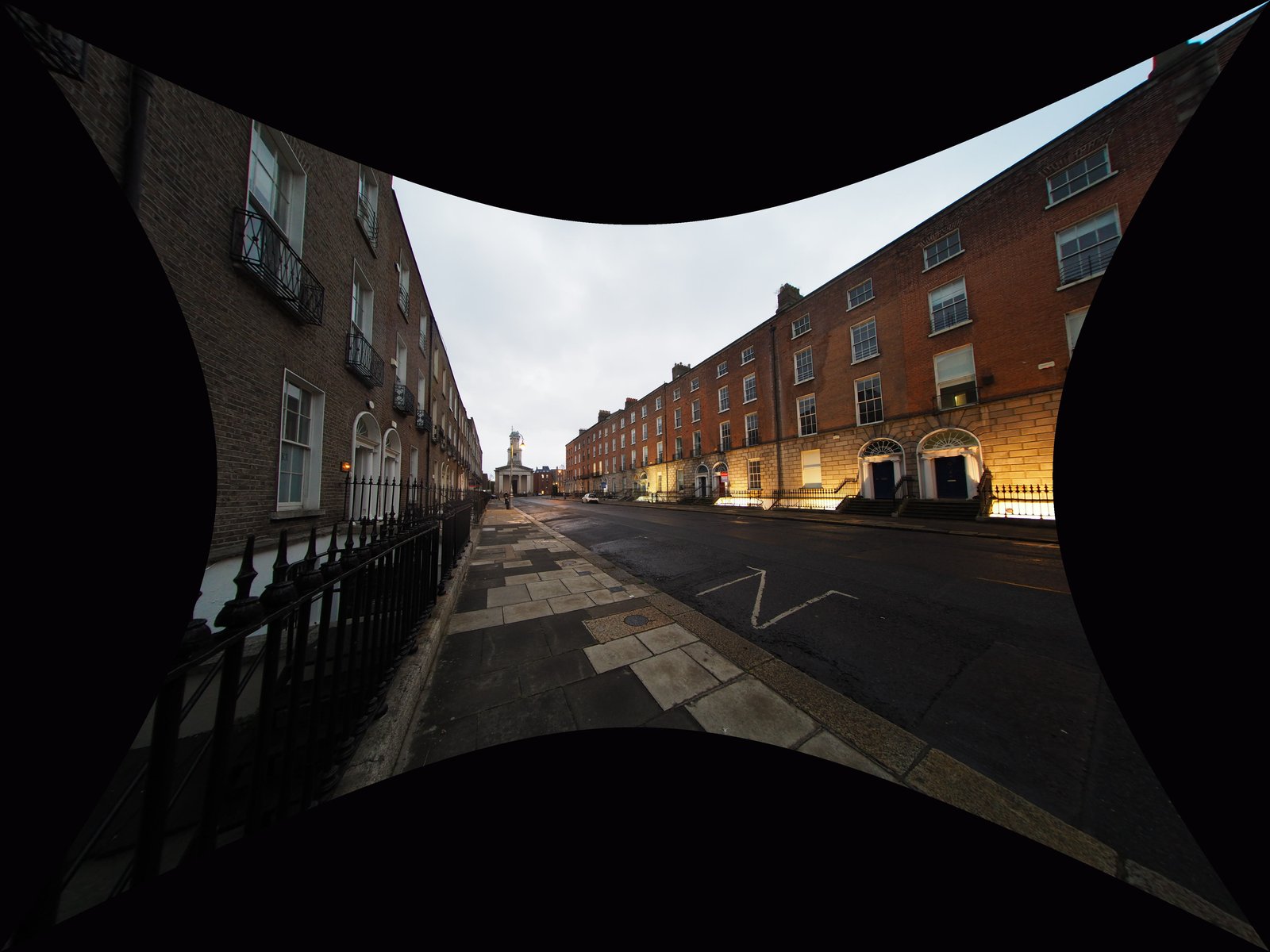
<p>The projection is now rectilinear — lines are straight — but mapping a curved frame onto a flat
one leaves empty <strong>black wedges</strong> at the edges where no pixels exist.</p>

<p><img src="/assets/images/defish-7artisans/02-defished-uncropped.jpg" alt="defished, uncropped" /></p>

<h3 id="3-after-the-centered-crop">3. After the centered crop</h3>

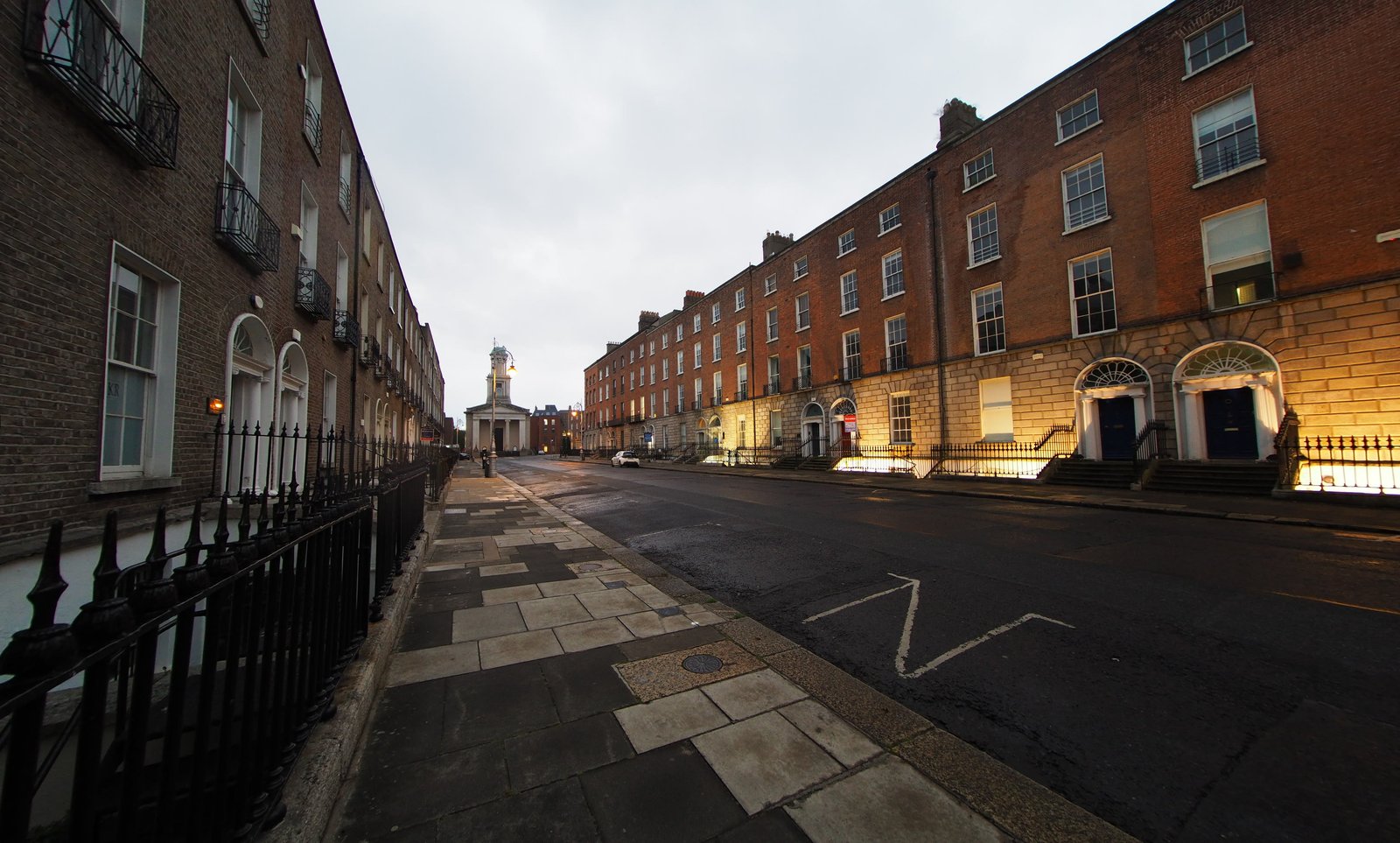
<p>The <code class="language-plaintext highlighter-rouge">crop</code> filter trims those wedges away, leaving a clean rectangle.</p>

<p><img src="/assets/images/defish-7artisans/03-final-cropped.jpg" alt="final, cropped" /></p>

<h2 id="what-each-parameter-does">What each parameter does</h2>

<table>
  <thead>
    <tr>
      <th>Parameter</th>
      <th>Value</th>
      <th>Meaning</th>
    </tr>
  </thead>
  <tbody>
    <tr>
      <td><code class="language-plaintext highlighter-rouge">input=fisheye</code></td>
      <td>—</td>
      <td>Treat the source as a fisheye projection.</td>
    </tr>
    <tr>
      <td><code class="language-plaintext highlighter-rouge">output=flat</code></td>
      <td>—</td>
      <td>Re-project to rectilinear (straight lines stay straight).</td>
    </tr>
    <tr>
      <td><code class="language-plaintext highlighter-rouge">id_fov</code></td>
      <td><code class="language-plaintext highlighter-rouge">142</code></td>
      <td><strong>Input diagonal FOV</strong> of the lens, in degrees. The key correctness knob.</td>
    </tr>
    <tr>
      <td><code class="language-plaintext highlighter-rouge">d_fov</code></td>
      <td><code class="language-plaintext highlighter-rouge">142</code></td>
      <td><strong>Output</strong> diagonal FOV — framing/zoom. Set equal to <code class="language-plaintext highlighter-rouge">id_fov</code> to keep all captured content.</td>
    </tr>
    <tr>
      <td><code class="language-plaintext highlighter-rouge">w</code> / <code class="language-plaintext highlighter-rouge">h</code></td>
      <td><code class="language-plaintext highlighter-rouge">9216</code> / <code class="language-plaintext highlighter-rouge">6912</code></td>
      <td>Output resolution (here 2× the 4608×3456 source).</td>
    </tr>
    <tr>
      <td><code class="language-plaintext highlighter-rouge">interp</code></td>
      <td><code class="language-plaintext highlighter-rouge">lanczos</code></td>
      <td>Interpolation quality. Default is bilinear (softer).</td>
    </tr>
    <tr>
      <td><code class="language-plaintext highlighter-rouge">crop=W:H:X:Y</code></td>
      <td><code class="language-plaintext highlighter-rouge">6062:3648:(iw-ow)/2:(ih-oh)/2</code></td>
      <td>Removes the black wedges. The expressions auto-center the crop.</td>
    </tr>
  </tbody>
</table>

<h3 id="correctness-vs-framing--keep-these-separate">Correctness vs. framing — keep these separate</h3>

<ul>
  <li><strong><code class="language-plaintext highlighter-rouge">id_fov</code> decides whether lines come out straight.</strong> It describes the <em>lens</em>. Get it wrong and
nothing else fixes it. Over-corrected (edges pushed out, stretched) → <code class="language-plaintext highlighter-rouge">id_fov</code> too high.
Under-corrected (still bowed) → too low.</li>
  <li><strong><code class="language-plaintext highlighter-rouge">d_fov</code> and <code class="language-plaintext highlighter-rouge">crop</code> decide what you see.</strong> They don’t affect correctness. Keeping <code class="language-plaintext highlighter-rouge">d_fov</code>
equal to <code class="language-plaintext highlighter-rouge">id_fov</code> preserves the full captured frame, then <code class="language-plaintext highlighter-rouge">crop</code> reclaims a rectangle from it.</li>
</ul>

<h2 id="removing-the-black-corners">Removing the black corners</h2>

<p>The <code class="language-plaintext highlighter-rouge">crop</code> filter runs last in the chain. The expression form auto-centers, so you only set the
output rectangle:</p>

<div class="language-sh highlighter-rouge"><div class="highlight"><pre class="highlight"><code><span class="nv">crop</span><span class="o">=</span>6062:3648:<span class="o">(</span>iw-ow<span class="o">)</span>/2:<span class="o">(</span>ih-oh<span class="o">)</span>/2
</code></pre></div></div>

<p>Here <code class="language-plaintext highlighter-rouge">iw</code>/<code class="language-plaintext highlighter-rouge">ih</code> are the incoming (post-remap) dimensions and <code class="language-plaintext highlighter-rouge">ow</code>/<code class="language-plaintext highlighter-rouge">oh</code> are the width/height you
set — <code class="language-plaintext highlighter-rouge">(iw-ow)/2:(ih-oh)/2</code> always centers. <code class="language-plaintext highlighter-rouge">crop</code> is a pure pixel cut: no resampling, no
quality loss. To find your own <code class="language-plaintext highlighter-rouge">W:H</code>, render once without the crop, read the largest clean
rectangle off the result in any image viewer, and plug those numbers in.</p>

<h2 id="quality-notes">Quality notes</h2>

<ul>
  <li><strong><code class="language-plaintext highlighter-rouge">interp=lanczos</code></strong> is the cheapest quality win over the bilinear default. <code class="language-plaintext highlighter-rouge">spline16</code> is a
slightly softer alternative that rings less on high-contrast edges.</li>
  <li><strong>Feed it the best source.</strong> If you shoot raw, develop to a 16-bit TIFF and run <em>that</em> through
ffmpeg rather than a camera JPEG. Out-of-camera JPEGs are a hard ceiling.</li>
  <li><strong>Don’t re-compress at the end.</strong> PNG/TIFF output is lossless. For JPEG, use <code class="language-plaintext highlighter-rouge">-q:v 2</code>.</li>
  <li>
    <p><strong>Supersampling</strong> (render at 2× then downscale with lanczos) further reduces edge aliasing.
The <code class="language-plaintext highlighter-rouge">w=9216:h=6912</code> above is already 2× the source; add a trailing <code class="language-plaintext highlighter-rouge">scale</code> if you want to
deliver at native size:</p>

    <div class="language-sh highlighter-rouge"><div class="highlight"><pre class="highlight"><code>...interp<span class="o">=</span>lanczos,crop<span class="o">=</span>6062:3648:<span class="o">(</span>iw-ow<span class="o">)</span>/2:<span class="o">(</span>ih-oh<span class="o">)</span>/2,scale<span class="o">=</span>3031:1824:flags<span class="o">=</span>lanczos
</code></pre></div>    </div>
  </li>
</ul>

<h2 id="calibrating-for-your-setup">Calibrating for your setup</h2>

<p>Lens sample variation and how you read FOV mean your ideal <code class="language-plaintext highlighter-rouge">id_fov</code> may differ slightly.</p>

<ol>
  <li>Shoot something with strong straight lines near the frame edges (a building, a doorway).</li>
  <li>Start from <code class="language-plaintext highlighter-rouge">id_fov=142</code> (with <code class="language-plaintext highlighter-rouge">d_fov</code> equal to it).</li>
  <li>If edges are still bowed, raise <code class="language-plaintext highlighter-rouge">id_fov</code>; if over-corrected/stretched, lower it. Adjust in
~1° steps.</li>
  <li>Once lines are straight, set <code class="language-plaintext highlighter-rouge">crop</code> purely for framing.</li>
</ol>

<hr />

<p><em>Lens: 7Artisans II 7.5mm f/2.8 · Body: Olympus E-M10II (4:3) · Tool: ffmpeg <code class="language-plaintext highlighter-rouge">v360</code> filter.
Example image: Dublin Georgian terrace.</em></p>]]></content><author><name></name></author><summary type="html"><![CDATA[A one-command way to convert the heavy fisheye curvature from a 7Artisans 7.5mm Mark II f/2.8 (a APSC diagonal fisheye on MFT) into a natural-looking rectilinear image, using only ffmpeg. No GUI, no plugins, no lens profile required.]]></summary></entry><entry><title type="html">Notes on Geotagging with exiftool</title><link href="https://pudelkom.github.io/2026/05/08/geotagging-with-exiftool.html" rel="alternate" type="text/html" title="Notes on Geotagging with exiftool" /><published>2026-05-08T21:19:19+00:00</published><updated>2026-05-08T21:19:19+00:00</updated><id>https://pudelkom.github.io/2026/05/08/geotagging-with-exiftool</id><content type="html" xml:base="https://pudelkom.github.io/2026/05/08/geotagging-with-exiftool.html"><![CDATA[<h3 id="record-a-gps-trace-from-photos-with-tags">Record a GPS trace from photos with tags:</h3>

<div class="language-plaintext highlighter-rouge"><div class="highlight"><pre class="highlight"><code>exiftool -i HIDDEN -if '$gps:all' -fileOrder gpsdatetime -GPSDateTime -gpslatitude -gpslongitude -gpsaltitude -GPSLatitudeRef -GPSLongitudeRef -csv /path/to/folder &gt; track.csv
</code></pre></div></div>

<h3 id="fix-timezone-on-images-to-be-tagged">Fix timezone on images to be tagged:</h3>

<p>Inspect existing time related data:</p>

<div class="language-plaintext highlighter-rouge"><div class="highlight"><pre class="highlight"><code>exiftool -time:all -G1 -a -s /path/to/file
[System]        FileModifyDate                  : 2026:01:01 00:03:02+00:00
[System]        FileAccessDate                  : 2026:04:20 21:09:36+01:00
[System]        FileInodeChangeDate             : 2026:01:01 00:03:02+00:00
[IFD0]          ModifyDate                      : 2026:01:01 00:03:02
[ExifIFD]       DateTimeOriginal                : 2026:01:01 00:03:02
[ExifIFD]       CreateDate                      : 2026:01:01 00:03:02
[Olympus]       DateTimeUTC                     : 2025:12:31 15:03:02
</code></pre></div></div>

<p>In this case we see that the picture has the correct time in UTC, but stored in a proprietary tag (<code class="language-plaintext highlighter-rouge">[Olympus]</code>). We just need to set a +09:00 timezone offset to make <code class="language-plaintext highlighter-rouge">DateTimeOriginal</code> correct:</p>

<div class="language-plaintext highlighter-rouge"><div class="highlight"><pre class="highlight"><code>exiftool -i HIDDEN '-OffsetTime*=+09:00' /path/to/folder
</code></pre></div></div>

<p>It is critical that the timestamps in the track.csv (<code class="language-plaintext highlighter-rouge">GPSDateTime</code>, always UTC) and the timestamps in the pictures (<code class="language-plaintext highlighter-rouge">DateTimeOriginal</code> + <code class="language-plaintext highlighter-rouge">OffsetTime</code>) are correct. Otherwise exiftool will interpolate from the wrong data points.</p>

<h3 id="apply-trace">Apply trace:</h3>

<p>Adjust <code class="language-plaintext highlighter-rouge">GeoMaxExtSecs</code> and <code class="language-plaintext highlighter-rouge">GeoMaxIntSecs</code> depending on the densitiy of you tracking data and how much margin of error is acceptable.</p>

<div class="language-plaintext highlighter-rouge"><div class="highlight"><pre class="highlight"><code>exiftool -i HIDDEN -geotag=track.csv -api GeoMaxExtSecs=43200 -api GeoMaxIntSecs=43200 /path/to/folder
</code></pre></div></div>

<h3 id="vizualizing-a-trace">Vizualizing a Trace:</h3>

<p>For importing a GPS trace into other tools, it’s better to use the more common GPX format. This format together with replacing <code class="language-plaintext highlighter-rouge">-csv</code> with <code class="language-plaintext highlighter-rouge">-p gpx.fmt</code> does that:</p>

<div class="language-plaintext highlighter-rouge"><div class="highlight"><pre class="highlight"><code>#------------------------------------------------------------------------------
# File:         gpx.fmt
#
# Description:  Example ExifTool print format file to generate a GPX track log
#
# Usage:        exiftool -p gpx.fmt -ee3 FILE [...] &gt; out.gpx
#
# Requires:     ExifTool version 10.49 or later
#
# Revisions:    2010/02/05 - P. Harvey created
#               2018/01/04 - PH Added IF to be sure position exists
#               2018/01/06 - PH Use DateFmt function instead of -d option
#               2019/10/24 - PH Preserve sub-seconds in GPSDateTime value
#
# Notes:     1) Input file(s) must contain GPSLatitude and GPSLongitude.
#            2) The -ee3 option is to extract the full track from video files.
#            3) The -fileOrder option may be used to control the order of the
#               generated track points when processing multiple files.
#------------------------------------------------------------------------------
#[HEAD]&lt;?xml version="1.0" encoding="utf-8"?&gt;
#[HEAD]&lt;gpx version="1.0"
#[HEAD] creator="ExifTool $ExifToolVersion"
#[HEAD] xmlns:xsi="http://www.w3.org/2001/XMLSchema-instance"
#[HEAD] xmlns="http://www.topografix.com/GPX/1/0"
#[HEAD] xsi:schemaLocation="http://www.topografix.com/GPX/1/0 http://www.topografix.com/GPX/1/0/gpx.xsd"&gt;
#[HEAD]&lt;trk&gt;
#[HEAD]&lt;number&gt;1&lt;/number&gt;
#[HEAD]&lt;trkseg&gt;
#[IF]  $gpslatitude $gpslongitude
#[BODY]&lt;trkpt lat="$gpslatitude#" lon="$gpslongitude#"&gt;
#[BODY]  &lt;ele&gt;$gpsaltitude#&lt;/ele&gt;
#[BODY]  &lt;time&gt;${gpsdatetime#;my ($ss)=/\.\d+/g;DateFmt("%Y-%m-%dT%H:%M:%SZ");s/Z/${ss}Z/ if $ss}&lt;/time&gt;
#[BODY]&lt;/trkpt&gt;
#[TAIL]&lt;/trkseg&gt;
#[TAIL]&lt;/trk&gt;
#[TAIL]&lt;/gpx&gt;
</code></pre></div></div>

<p>The resulting GPX can then we viewed with common tools like <a href="https://gpx.studio">gpx.studio</a>.</p>]]></content><author><name></name></author><summary type="html"><![CDATA[Record a GPS trace from photos with tags:]]></summary></entry></feed>